Migma is worth a look if you send marketing emails for a brand and you don’t have a designer: you describe the email, it builds a real HTML version, checks it in the main inboxes and can send it too. The free plan is enough to try it. After that the first paid plan is $99.99 a month, which is a lot for a solo founder.
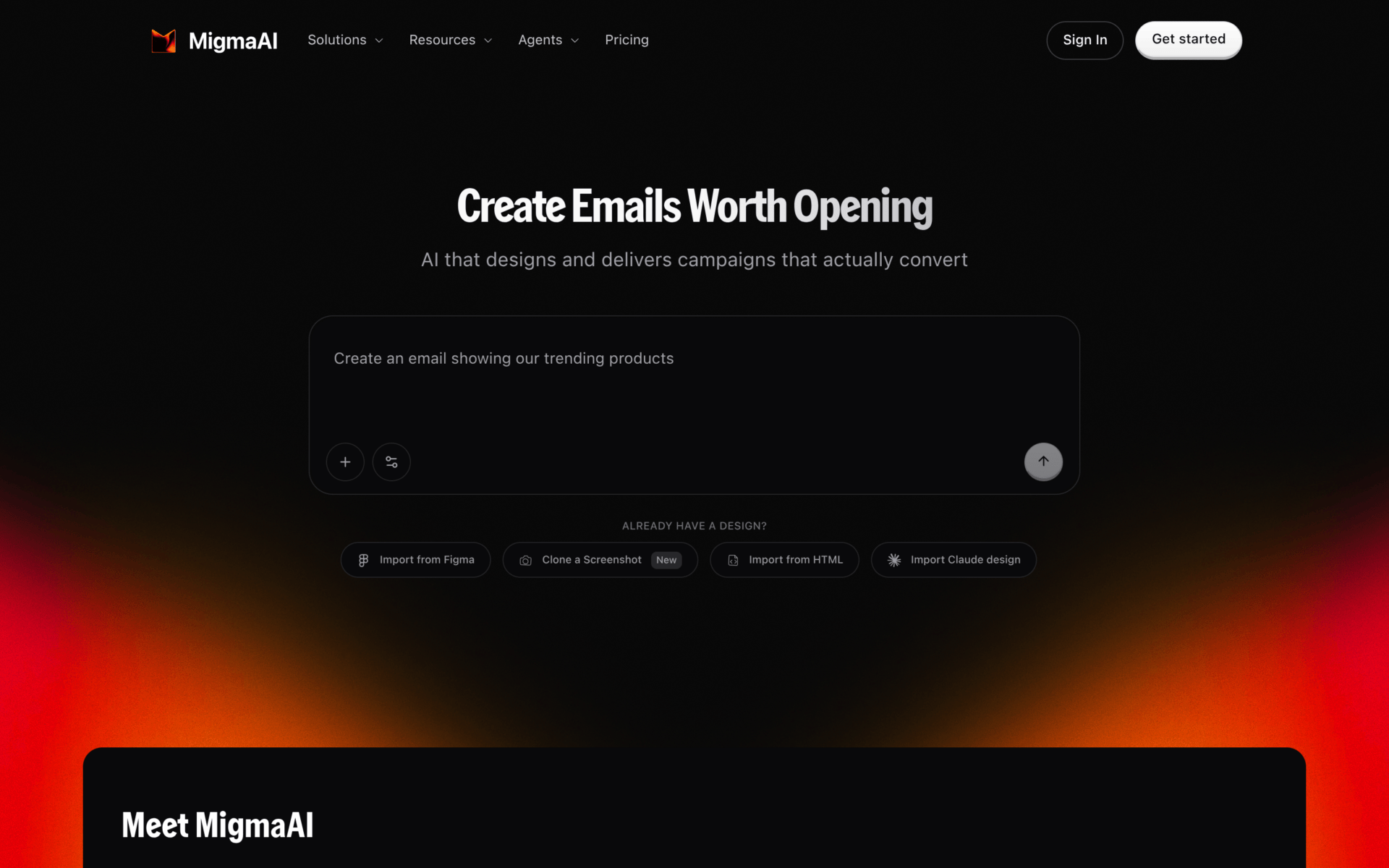
Think of Migma as “Lovable for emails”, which is literally how Tech Funding News described it. You type what you want (“an email showing our trending products”), and you get an email in your brand colors that you can edit, test and send.
Quick facts
- What it is: AI email builder and sender
- Best for: small brands and marketers who send newsletters and promos without a designer
- Price from: Free, then $99.99/month
- Free plan: yes, 30 AI credits and 2,000 sends a month, no credit card
- Platforms: web app, plus API, SDK, CLI and an MCP server
- Rating: 3.7 / 5
- Website: migma.ai
How I reviewed it
I review every tool the same way: what it does, how it works day to day, what it really costs, and what people who use it say on review sites, Reddit and YouTube. The score comes from that, never from the company. Full process on my about page.
What is Migma?
Migma is a web app that writes and designs marketing emails with AI, then lets you send them from the same place. It was founded in 2024 by two brothers, Adam and Liam Lababidi, and it is backed by EWOR.
The starting point can be almost anything: a short prompt, a screenshot of an email you like, a Figma file, some HTML, a blog post URL or even a YouTube video. Migma also pulls your logo, colors, fonts and tone from your website, so the first draft already looks like your brand.
If you’ve used Canva’s AI design features, it’s the same idea. The difference is that the output is an email that has to survive Outlook, Gmail and dark mode, which is the hard part.
Main features
Write one email or a whole series
You describe a goal (a launch, a welcome flow, a weekly newsletter) and Migma drafts it. For flows, you describe the whole sequence once and it prepares the connected emails together on a canvas, so the story stays the same from email one to email four.
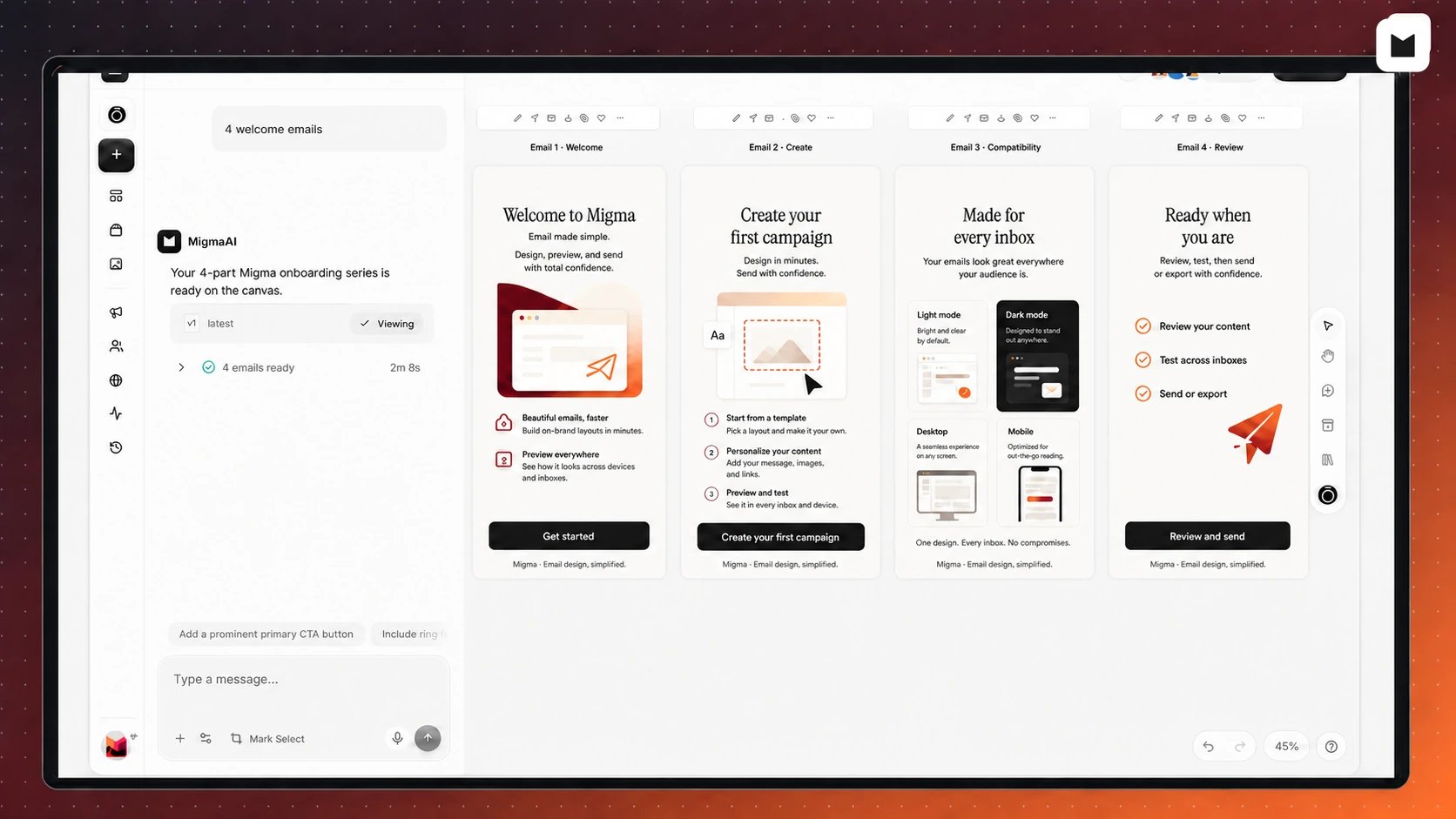
You stop rewriting the same welcome email four times in four different tones.
Edit by clicking, without HTML
The visual editor works like a design tool. You click a headline to change it, swap or crop an image, change a button’s link and color, or move whole sections. There’s a layers panel, a mobile preview and a library where you save sections to reuse later.
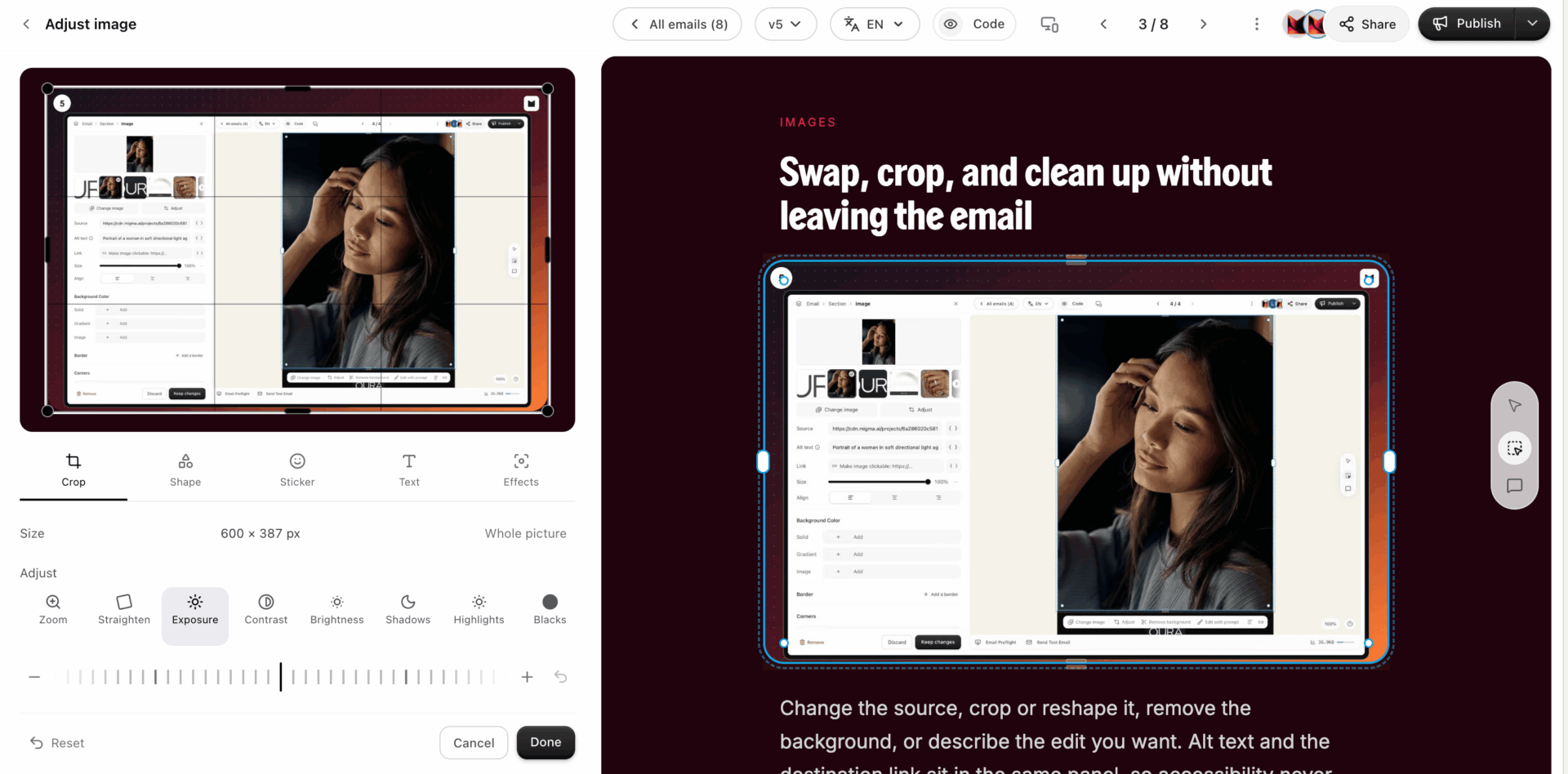
If you want the code, it’s there too. But you never have to touch it.
Check it before it lands in someone’s inbox
Email Preflight shows your email in Outlook, Gmail, Apple Mail, on mobile and in dark mode. It also checks broken links, spelling and grammar, and spam risk, with a simple green, yellow or red result.
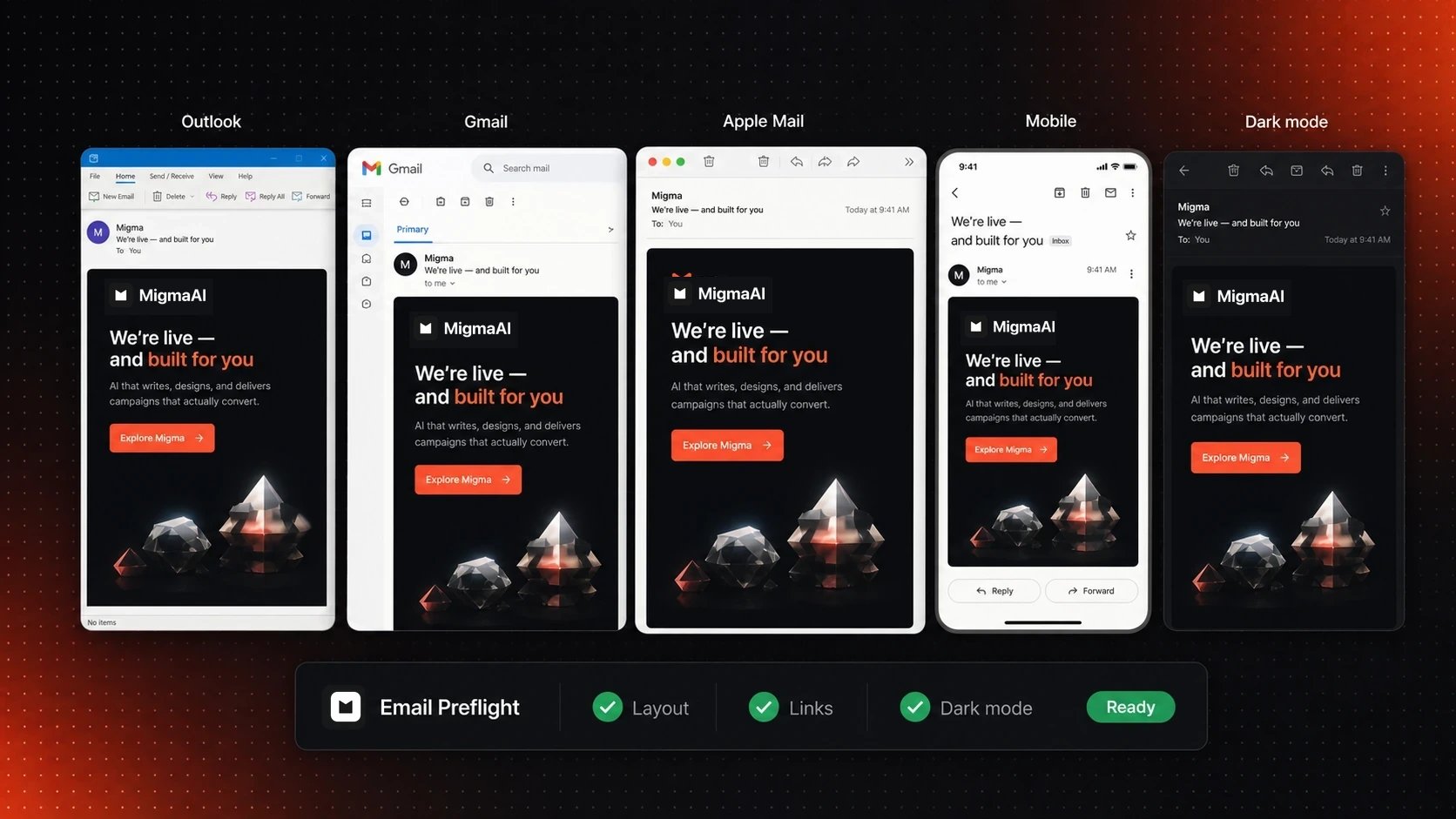
This is the part I care about most. Anyone who has sent a newsletter that looked perfect in Gmail and broken in Outlook knows why.
Send from Migma, or export to your current tool
You can send from Migma with your own domain (it sets up DKIM, SPF and DMARC for you), or connect Amazon SES, Resend, SendGrid or Mailgun. If you already live in Klaviyo, Mailchimp, HubSpot, Brevo or Omnisend, you can export the email there instead.
One rule: Migma is for permission-based email only. Cold outreach and bought lists are not allowed.
For developers: API, SDK and MCP
There’s a REST API, a TypeScript SDK, a CLI and an MCP server, so you can ask Claude or Cursor to create emails in Migma directly. Most marketers won’t need it. If you build products, it’s a nice extra.
What I like
- One tool from idea to inbox. Builders like Stripo and RGE Studio stop at the design. Migma writes the email, tests it in real inboxes and sends it.
- The brand import. Paste your website and your logo, colors and fonts come along. That’s the step that usually makes AI emails look generic.
- Preflight before sending. Inbox previews and link checks come in the same flow, without a separate testing tool.
- It plays nice with what you already use. Export to Klaviyo, Mailchimp and friends means you can try it without moving your whole list.
- The team ships. Two Product Hunt launches in 2026 alone (February and July), and the launch comments say they push updates often.
What could be better
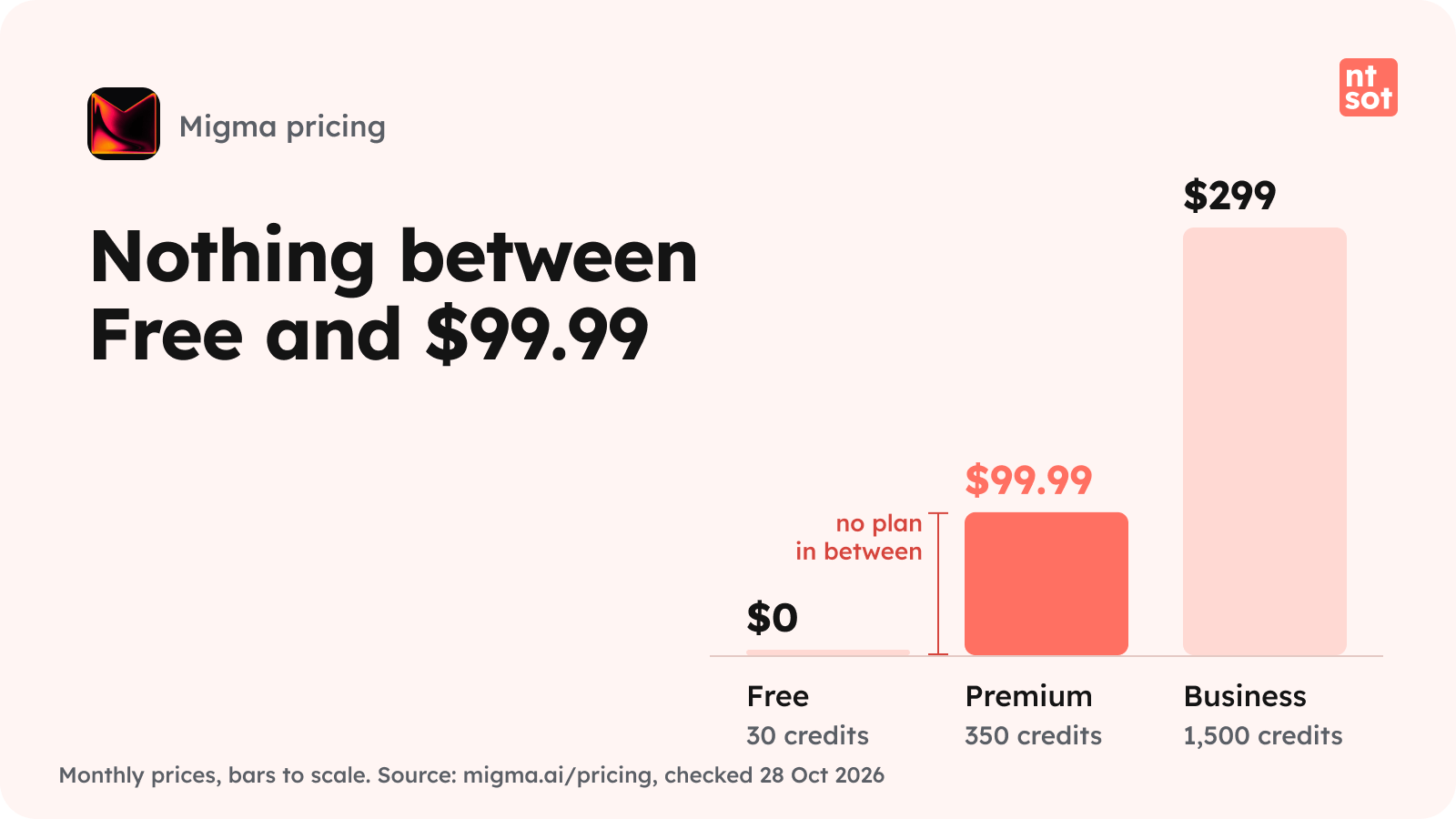
- The price jump. Free, then straight to $99.99 a month. There used to be a cheaper Basic plan at $34.99 (it still appears on Capterra), but it’s gone from the pricing page. For a solo founder sending one newsletter a week, that’s a big step.
- Credits are a black box. The plans count “AI credits” (30, 350, 1,500 a month), but neither the pricing page nor the docs say what one credit buys. You find out by using them.
- Almost no independent reviews. I found zero Reddit threads and zero YouTube reviews from people outside the company. The few ratings that exist are great, but it’s a tiny sample.
- The docs and the pricing page disagree. The docs FAQ still talks about a 7-day trial on a paid plan, while the pricing page offers a free plan with no card. Small thing, but it makes you double-check everything.
What users say
There isn’t much to read yet, so take this with care.
On G2, Migma has 5.0 from 2 reviews, both from September 2026. One reviewer likes that a plain-language description turns into the email, the flow, the audience segment and the schedule. The other likes how customizable the designs are. Neither lists a downside.
On Product Hunt, the July 2026 launch finished #2 of the day with 457 upvotes, and the product has 5.0 from 3 reviews. Comments on the February launch say the emails render well across clients and that the team updates the product often.
Capterra has no reviews yet. Reddit and YouTube: nothing independent so far.
On the press side, Tech Funding News names Cloudflare, Wix, LA Times and Versace as customers.
Migma pricing
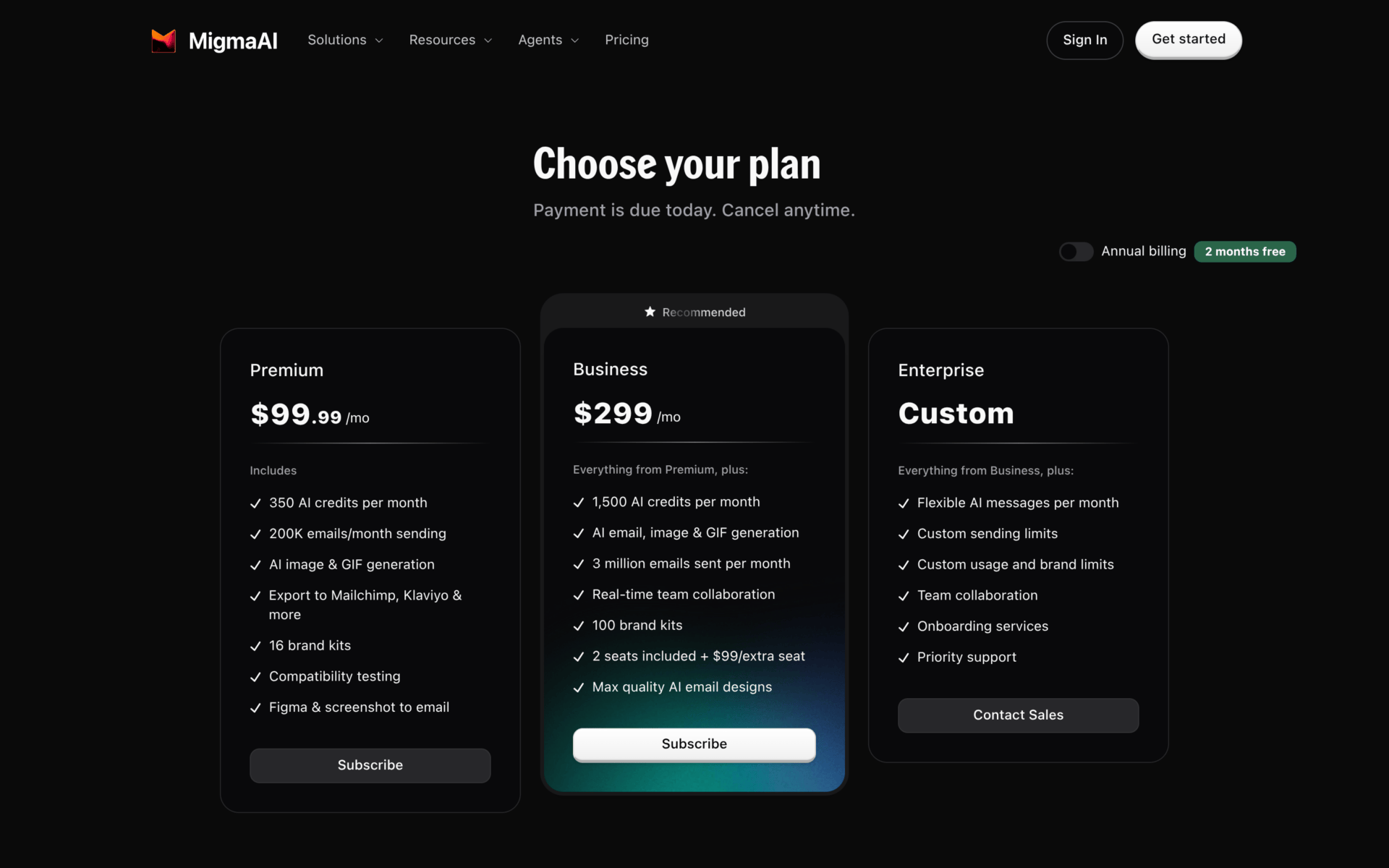
The free plan covers a small newsletter: 2,000 sends a month is fine for a list of a few hundred people. You’ll hit the wall when you want to export to Klaviyo or Mailchimp, or use the API, because both need a paid plan.
Premium adds Figma and screenshot import, exports, image and GIF generation, and inbox testing. Business adds real-time team editing and 2 seats (each extra seat is $99 a month). Annual billing gives you 2 months free, and there’s a 30-day money-back guarantee. No lifetime deal that I could find.
Prices checked on 28 Oct 2026 on the official pricing page.
Migma vs alternatives
- Stripo: a classic drag-and-drop email builder. Cheaper (paid plans from $20 a month) but it doesn’t send, and it doesn’t build emails from a prompt.
- RGE Studio (formerly Beefree): an email and landing page builder with AI writing help. From $30 a month, design only, sending happens in your email tool.
- Klaviyo: a full email and SMS platform with its own AI. Free up to 250 contacts and 500 sends a month. Better if you run a store and need deep automations. Migma can export into it anyway.
Still curious about what I use day to day? Here are my 10 favourite tools.
Who should use it (and who should skip it)
Use Migma if:
- You send promos or newsletters for a brand and you don’t have a designer
- You want to go from idea to tested email in one place
- You already use Klaviyo or Mailchimp and want better-looking emails to export there
Skip Migma if:
- You send one small newsletter a week and $99.99 a month is more than your whole tool budget
- You do cold outreach (it’s not allowed)
- You want a builder with years of user reviews behind it
Score
Verdict
Migma does the full job: you describe an email, it builds it in your brand, checks it in real inboxes and sends it. The free plan is a good test drive. The jump to $99.99 a month and the lack of independent reviews are why it’s a 3.7 and not higher. Try it at migma.ai.
FAQ
Yes. The free plan includes 30 AI credits, 2 brand kits and up to 2,000 sends a month (max 100 a day), with no credit card. Exports and API access need a paid plan.
Both. You can send from Migma with your own domain, connect Amazon SES, Resend, SendGrid or Mailgun, or export to Klaviyo, Mailchimp, HubSpot, Brevo or Omnisend.
No. Migma only allows permission-based email. Cold outreach, scraped lists and bought lists are against its rules.
Yes. You can turn a Figma file into an email. On the paid plans, Figma and screenshot import are part of Premium and up.
Want 5 tools like this every Monday?
NTSOT is my free newsletter. Five tools a week, no recycled lists.

LucaG
Luca Casamassima (LucaG) is the founder of the NTSOT newsletter and co-founder and CEO of ShortPen. He tests every tool he reviews himself and sends 5 new tools to founders and marketers every Monday.